OpenAI now publishes an official RSS feed from its Release Notes page, including an API category. It solves one monitoring gap, not the whole job.
Deprecations, pricing, incidents, callable model IDs, and detailed changelog entries still live on separate surfaces. One subscription will not catch them.
We run collectors against provider API surfaces, so the honest version is that every method here misses something. The question is which failure you can live with.
The feed covers announcements, not the whole API
| Surface | What it carries | Practical monitor |
|---|---|---|
| Release Notes | Product and API announcements | Official RSS feed, filtered page |
| Developer changelog | Detailed API features and endpoint changes | Page or Markdown diff |
| Deprecations page | Retirement dates and replacement models | Page or Markdown diff, plus email to active users |
| API pricing | Published model rates | Page diff or manual check |
| Status page | Incidents and degradations | Native subscription |
| Models endpoint | Callable model identifiers | Authenticated polling |
The Release Notes feed fixes the announcement problem. It does not turn those six surfaces into one ledger. A rate can change without becoming a release note, an incident subscription says nothing about a retirement date, and a callable ID can appear before a detailed changelog entry.
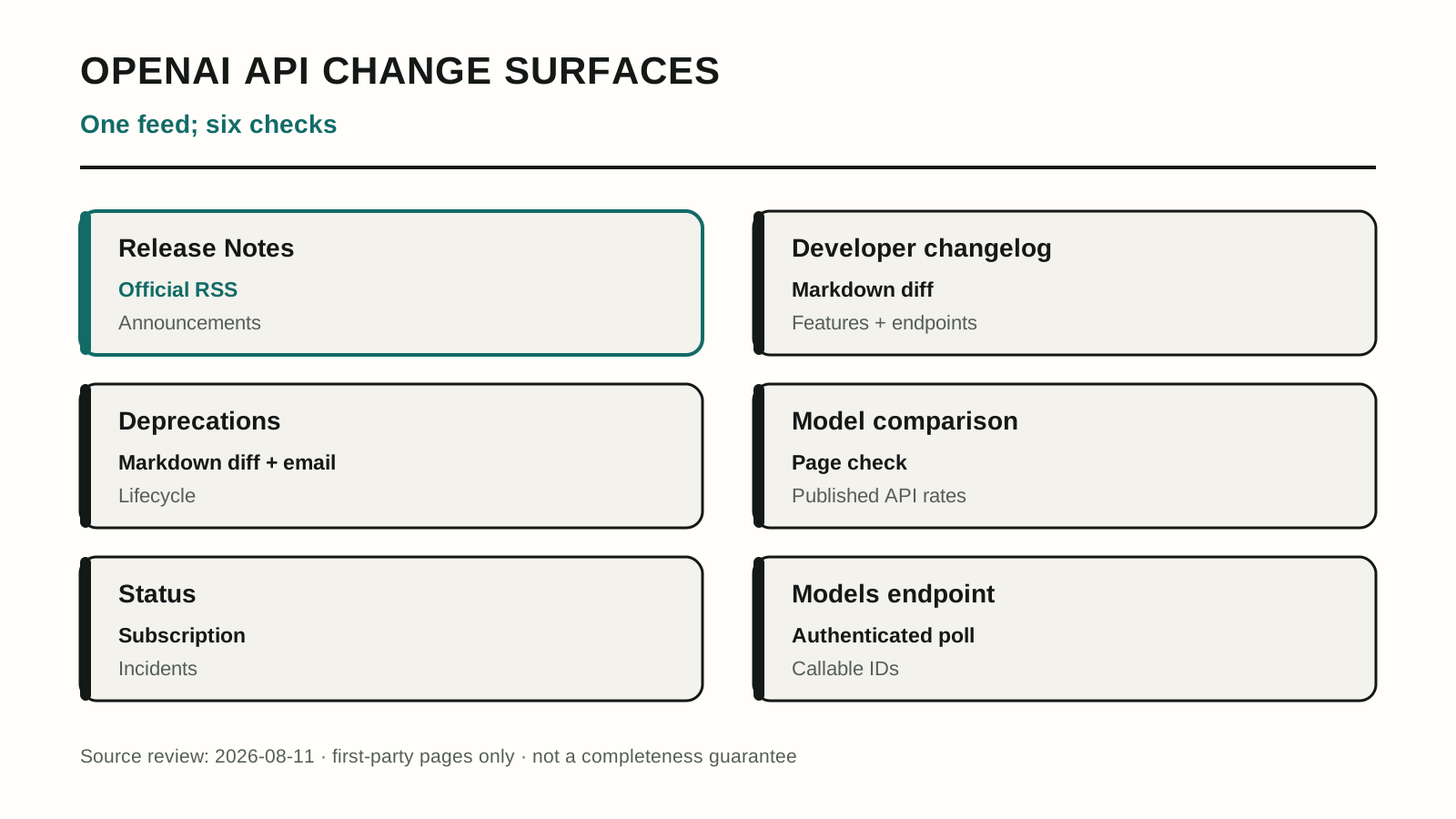
This map records the first-party surfaces we reviewed on August 11, 2026. It describes coverage routes, not an uptime or detection benchmark.
Deprecation email is another useful safety net, but OpenAI scopes it to customers with active usage on the affected model. A model you are evaluating or call intermittently may not put the right engineer on that path.
Official push is incomplete by design
Start with the Release Notes RSS feed and a status-page subscription. Route both into the same channel or queue where someone owns the alert. That gives announcements and incidents a dated, searchable record without maintaining a scraper.
Keep a human cadence for deprecations and pricing even after adding those subscriptions. OpenAI's notice window makes a weekly lifecycle check workable for generally available models, provided that the check still happens during a release crunch and a named person owns it.
The honest limit: official push covers what OpenAI chooses to push. It is an announcement stream and an incident stream, not proof that pricing, lifecycle state, and callable IDs stayed unchanged.
Markdown diffs beat rendered HTML
OpenAI's developer documentation advertises Markdown versions of its pages by appending .md. That gives the changelog and deprecations record a cleaner monitoring surface than rendered HTML.
Fetch those documents on a schedule, store the response hash, and alert when it changes. Record the HTTP status, content type, and a heartbeat even when the hash stays still. Without that heartbeat, a broken monitor and a quiet week look identical from the alert channel.
Pricing may still need its own page diff or manual check because it sits outside that documentation record. Keep it as a separate monitor rather than assuming a changelog diff will catch a changed rate card.
The honest limit: a diff proves that bytes changed, not what the change means. Markdown removes much of the design noise, but a documentation reorganization can still fire alerts that need a human verdict.
The API shows what is callable
Rather than watch only the pages, watch what they describe. The models endpoint lists callable model IDs and changes when the catalog changes. Pricing, lifecycle state, release notes, and incidents can each be collected from their own official surfaces and normalized into one stream.
Radar takes that approach across 20 providers. It catches things a changelog reader cannot for a structural reason rather than a clever one: a new model ID is an observable fact about the API, while a changelog entry is an editorial decision someone makes later.
The caveats are the point of the method, so they belong in the open.
Polling records what public sources expose and when the system observes them. It has no private provider access and cannot guarantee it sees anything first. An artifact appearing in a catalog is not the same as a launch, which is why observed IDs have to be labeled as observed rather than confirmed, and why a monitoring product that presents every new ID as a release will cry wolf several times a quarter. Detection also cannot outrun the source: if a provider publishes a price change only in a blog post, no amount of endpoint polling finds it early.
Building this yourself is a real project, not an afternoon. Twenty providers means twenty auth schemes, twenty rate limits, and a normalization layer that turns dissimilar payloads into comparable events. Buying it means trusting someone else's collector coverage. Either way you are maintaining a system, not a bookmark.
Which one you should pick
| Your situation | Reasonable choice |
|---|---|
| One provider, one model, low call volume | Release Notes RSS, status subscription, and a weekly deprecation check |
| One provider, production traffic | Official subscriptions plus Markdown diffs and model-endpoint polling |
| Two or more providers, or a model ID in production config | Automated monitoring, bought or built |
| Cost is the exposure, not availability | Diff pricing separately instead of assuming the changelog covers it |
The dividing line is not company size. It is whether a model ID is hard-coded somewhere that ships, because that is the failure that turns a documented six-month deprecation into a Tuesday outage.
Our pick for most teams running production traffic on one provider: subscribe to Release Notes and status, diff the changelog and deprecations Markdown, and poll the models endpoint. Keep a named owner on the alerts rather than trusting deprecation email to find the right person. Move to a normalized multi-provider monitor when you add a second provider, because that is where manual coverage becomes a headcount problem.
The thing worth checking this week, whichever method you choose: grep your codebase for hard-coded model IDs and confirm each one still appears in the models endpoint.
Frequently asked questions
01Does OpenAI have an RSS feed for its API changelog?
OpenAI has an official Release Notes RSS feed with an API category, though it is not a dedicated feed for the developer changelog. It is useful for announcements, but deprecation schedules, pricing, incidents, detailed changelog entries, and callable model IDs still require separate checks. Treat it as the first monitoring layer, not the only one.
02How much notice does OpenAI give before retiring a model?
OpenAI commits to at least six months for generally available models and at least three months for specialized variants of GA models. Safety or compliance retirements can move faster, with as much notice as reasonably possible. Active users are emailed, and the change is documented on the deprecations page.
03Where does OpenAI actually publish API changes?
OpenAI splits the record across its Release Notes and developer changelog, deprecations documentation, API pricing page, status page, and models endpoint. RSS covers announcements, status offers subscriptions, docs expose machine-readable Markdown, and the authenticated endpoint reveals callable IDs. No single surface carries every change type.
04Is email notification from OpenAI enough to catch deprecations?
It is the safety net, not the system. Deprecation email goes to accounts actively calling the affected model, so a model you plan to adopt or call intermittently may not trigger one. It also routes to whichever address owns the account, which is often not the on-call engineer.
External sources linked in this article
8- 01Release Notesopenai.com
- 02Developer changelogdevelopers.openai.com
- 03Deprecations pagedevelopers.openai.com
- 04API pricingdevelopers.openai.com
- 05Status pagestatus.openai.com
- 06Models endpointdevelopers.openai.com
- 07changelogdevelopers.openai.com
- 08deprecations recorddevelopers.openai.com